Finance Guide: Touch ’n Go Parking System Reconciliation
Introduction
Reconciling Touch ’n Go transactions is an essential daily or monthly process for parking operators using digital payment channels under the Touch 'n Go ecosystem. Proper reconciliation ensures that all transactions collected in your system match the actual settlement received in your bank account. This guide explains a practical and structured approach to performing accurate reconciliation.
Process
1. Collect all required reports. You typically need:
a. TimeTec Parking System Report:
- Total Collection Report (by Date), refer to this link https://support.timeteccloud.com/portal/en/kb/articles/how-to-check-total-parking-income-in-timetec-parking-system
- Total Collection Report (by Date), refer to this link https://support.timeteccloud.com/portal/en/kb/articles/how-to-check-total-parking-income-in-timetec-parking-system
- TNG Card Summary Report: to provide Touch N Go collection information categorized by lane and batch number.
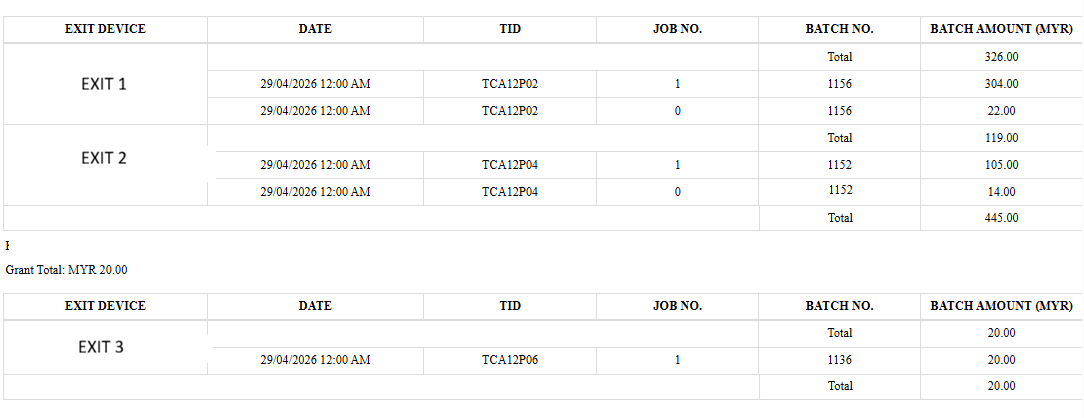
b. Touch ’n Go / payment gateway
- Daily Settlement Report: Touch ’n Go will send a Daily Settlement Report in Excel format to the receiving party via email.
- Daily Settlement Report: Touch ’n Go will send a Daily Settlement Report in Excel format to the receiving party via email.
2. Match by Date and Batch Number
a. Start your reconciliation by grouping data using:
- Transaction date
- Batch number: Batch number is a reference ID used to group a set of transactions that are processed together during a specific settlement cycle.
b. Each batch represents a group of transactions processed together. Ensure:
- Every batch in your system appears in the settlement report
- No batch is missing or duplicated
- Settlement dates align with transaction dates (some may be delayed by 1 day)
3. Compare Total Amounts
a. For each batch, compare:
- Total transaction count
- Total collected amount
- Commission Amount deducted
- Net payout received
b. Expected formula: Gross Amount – Commission Amount = Net Settlement
- If the net amount does not match, further investigation is needed.
4. During reconciliation, common issues include:
a. Settlement delay: Transactions may appear in the next batch due to processing cut-off time.
b. Network or gateway delay: Payment confirmed late, causing mismatch timing.
c. Failed or pending payments: System may show success, but payment is not captured in settlement.
d. Refunds or reversals: Refunded transactions may appear in separate reports.
e. Duplicate payment attempts: Users retry payment, causing duplicate entries.
5. Document the Reconciliation Report
This documentation is important for audit and finance tracking. A proper reconciliation report should include:
a. Date range
b. Batch numbers reviewed
c. Total matched amount
d. Unmatched transactions
e. Differences identified
f. Action required (if any)
6. Escalation (If Needed)
If discrepancies cannot be resolved, contact Touch ’n Go or payment gateway provider. Early escalation helps resolve settlement issues faster.
Provide:
a. Batch number
b. Transaction IDs
c. Screenshots of reports
d. Time and date details
Related Articles
Operator’s Guide: Handling Common Issues in TimeTec Parking System
Introduction The TimeTec Parking System is built to deliver a smooth, automated parking experience for both drivers and operators. However, certain issues may occasionally arise during daily operations. This guide provides quick troubleshooting steps ...How to Check Total Parking Income in TimeTec Parking System
Introduction Monitoring daily, weekly, or monthly parking income is an essential task for operators, finance teams, and management. The TimeTec Parking Management System provides a centralized dashboard and detailed reports to help users track all ...How to Check Parking Payment Records in TNG eWallet app (Step-by-Step Guide)
Introduction Parking in Malaysia has become significantly easier thanks to cashless payment solutions. One such system widely deployed across malls, office towers, and commercial complexes is the Timetec Parking System, which fully supports Touch 'n ...Holiday List Management Guide for Parking System Operations
Introduction This guide is prepared to assist parking system operators in managing the holiday list within the parking system. It provides step-by-step guidance on how to add next year’s public holidays as well as configure special or ad-hoc holidays ...How to Manage TimeTec Parking Kiosk, TPK- 1 in TimeTec Parking System
Introduction TimeTec Parking accepts all types of cashless payment methods, from the Touch 'n Go cards, the most popular and dominating 90% of parking cashless payment methods in Malaysia, to credit and debit cards and e-Wallets by QR Code scanning. ...