Corporate Season Pass Migration Guide for TimeTec Parking
Introduction
The Corporate Season Pass Import Wizard is designed to simplify the migration and onboarding process for corporate season parkers from an existing parking system into the TimeTec Parking system. This feature allows operators to bulk import season pass records using a standardised Excel template, significantly reducing manual data entry and improving onboarding efficiency for large corporate accounts.
**Important Notes:
- Only the provided Excel template should be used for import.
- Invalid records will not be imported into the system.
- Operators should verify all corporate details before confirming the import.
Process
1. Accessing the Import Wizard
1. Accessing the Import Wizard
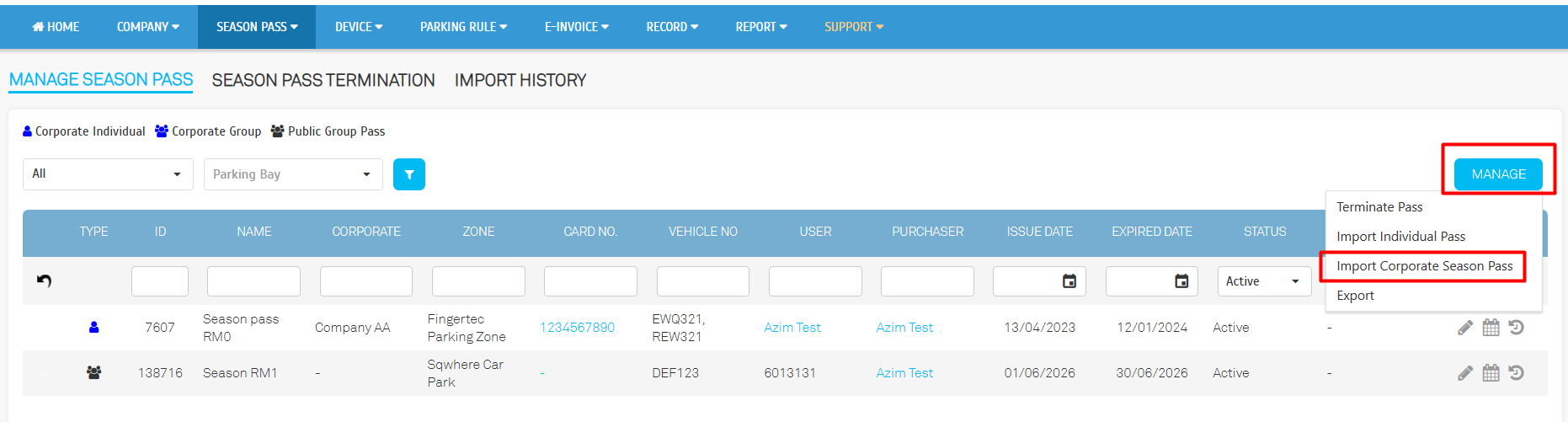
- Go to Company > Season Pass > Manage Season Pass > click 'Manage' button > Import Corporate Season Pass. Download the Excel template.
2. Fill in data in Excel file
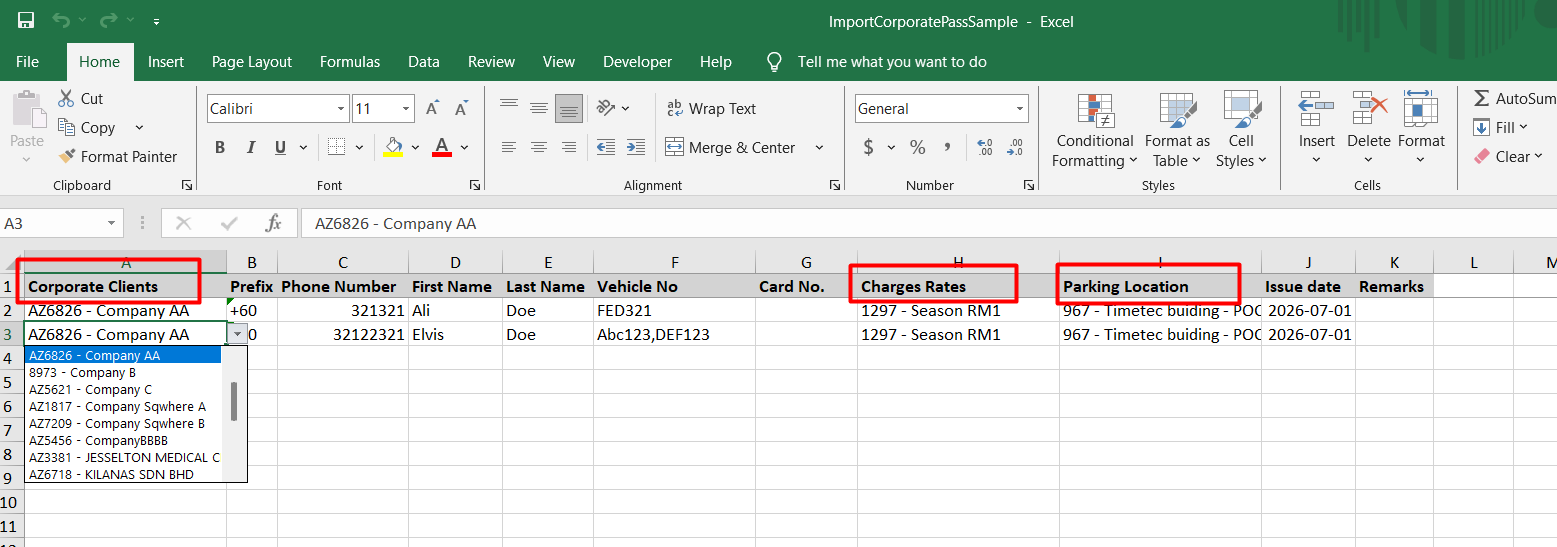
- Fill in the season parker details based on the Corporate (Group) name, Season Rate, and Parking Zone. The downloaded Excel file is preconfigured with selectable column data based on the TimeTec PMS data, so the operator only needs to select the relevant options in the Excel file.
3. Upload file into TimeTec Parking System
- Click 'Browse' button and upload the excel file and click Next.
- Set the Start Date and Expiry Date
- The Preview Records page provides a detailed breakdown of all uploaded season pass records. Click Submit to proceed.
Related Articles
TimeTec Parking Season Pass Renewal Guide: Step-by-Step Instruction
INTRODUCTION Renewing your season pass ensures uninterrupted access to your designated parking space without the hassle of reapplying. This guide will walk you through the step-by-step process to renew your pass quickly and efficiently. Whether your ...How to Change Reserved Bay ID for Season Pass in TimeTec Parking
Introduction In the TimeTec Parking system, parking administrators can assign a reserved parking bay for Season Pass users. If the user changes parking location or requires a new reserved bay, the admin can update the Bay ID directly from the Season ...How to Setup Charge Rates for Season Pass on TimeTec Parking
Introduction Season pass parking is a parking system where vehicle owners can park vehicles regularly near their homes or workplaces at a fixed monthly rate. The season parking module of the TimeTec Parking Management System by far is providing the ...Manage Your Season Pass: How to Edit Your Car Plate in TimeTec Parking Apps (LPR system)
Introduction Managing your parking access has never been easier with the TimeTec Parking App. If you have a Season Pass and need to update your vehicle information, for example, after changing your car or using a different vehicle temporarily, you ...How to Purchase a Season Pass via the TimeTec Parking App
INTRODUCTION The Timetec Parking Application offers a convenient and seamless way to manage your parking needs, and now, with the added feature of purchasing a Season Pass, you can enjoy unlimited parking access at your favorite locations. Whether ...